

An SEO report for clients is a short, regular summary that shows what you did, what changed, and what it means for their goals. The best reports lead with insight, not raw data. Your client wants to know whether their SEO is working and what you are doing next, not to wade through numbers they could pull themselves.
This guide gives you a six-part structure you can reuse every month, plus the metrics worth including. Follow it and you move from being a service provider to being the person your client trusts to read the numbers for them.
Why most SEO reports miss
They overwhelm. It often takes three or more SEO reporting tools to assemble one client report, and all that data buries the point. The client is not sure what to look at. One client on a marketing forum put it plainly:
"As a client of a few SEO agencies, I hate most monthly reports. It's almost always data without insights. I can see most of the important data myself. I'm hiring a professional who is meant to be advising me."
A good report puts you in the advisory seat. You interpret the data, connect it to the client's goals, and tell them what happens next. That is what they are paying for.
How to build an SEO report your client will actually read
1. Start with the objectives and KPIs
Know your scope first. Are you running the client's whole SEO, including technical SEO, link building, and keyword tracking? Or a specific slice of it?
Then understand their goal. When they open the report, what is the one thing they most want to see? Some clients want brand awareness, others want conversions. Their goal decides which metrics and SEO KPIs lead the report.
2. Put the key insights up top
Interpret the data for your client. Pull out the insights and tie them to your work:
- What does this metric mean for that goal?
- How did the work you did affect this result?
Do not hide bad news. If your client lost rankings after a Google update or picked up a manual action, give the context and say what you will do about it.
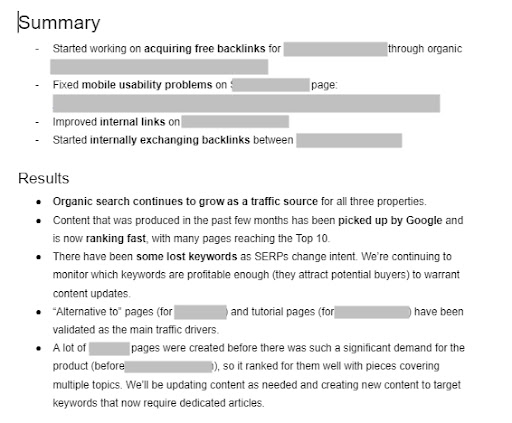
Tell a short story with the report, one your client can follow without you in the room.
3. Show month-over-month progress
Add a month-over-month (or quarter-over-quarter) section. This is where the client sees how their SEO has improved since you came on board. Report on the metrics they care about most, and add context to every change.
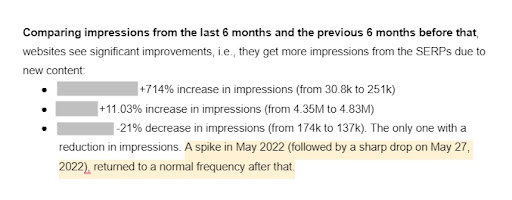
If something dipped, explain what happened and what you are doing next. Some tools track this history for you. Ours records the changes you made to a site and how each one affected the site's health, so month-over-month progress is easy to show.
4. Say what is coming next
Clients working with outsourced SEO teams often complain they do not know what is in the pipeline. Get ahead of that by spelling out your next actions. Tie them to the insights above or to the strategy you already agreed on. Use the report to keep the client in the loop.
5. Give a quick SEO health overview
If you handle the client's full SEO, run a monthly audit and report on the site's health. A health check-up covers technical items such as:
- Pagespeed and Core Web Vitals
- Indexed pages and any indexing issues
- Crawling and crawl errors
- Broken links
- Redirects
- Domain and link profile
- Security
Depending on whether technical SEO is in scope, expand on the detail or roll it into a single health score. A percentage score plus a prioritized to-do list is enough for most clients.

6. Then, and only then, the metrics
The sections above are the substance of the report. Whether you include the full metrics is between you and the client. It is worth asking: some clients only want the insights, others like the data on hand, especially if they have access to your tools.
The core areas to cover:
- Traffic and engagement
- Conversions
- Keyword rankings
- Content performance
- Backlinks
Keep it actionable. For rankings, do not just list every keyword. Highlight the ones rising fast and the ones declining, so you and the client both know what to repeat and what to fix.
Traffic and engagement
Depending on how much detail you want, include metrics such as monthly traffic, traffic versus the previous period, traffic by location and device, traffic per channel, pageviews, pages per session, average session duration, time on page, and the CTR curve. You will find most of these in Google Analytics.
Note that bounce rate is no longer a default metric in GA4. Google replaced it with engagement rate, so report engagement rate unless a client specifically asks for the old measure.
Conversions
Conversions mean different things to different clients, so get clarity first. Form fills or verified sales only? For an ecommerce client tracking sales, you might report overall conversions, new vs. repeat visitor conversions, organic conversions, conversions by device and location, cart abandonment, cost per conversion, customer lifetime value, and the highest and lowest converting pages.
Keyword rankings
Cover the keywords the client ranks for, their top keywords, ranking changes vs. the previous period, average position, the share of keywords in the top 10 and top 3, rising keywords, declining keywords, and keywords sitting just outside the top 3 or 10. Those last few are hard to surface with standard tools; ours flags rising keywords and low-hanging fruit for you.
Content performance
Much of this overlaps with rankings, but it is worth calling out your best-converting content, your highest-traffic content, internally competing pages, content that used to rank and now needs attention, and content gaining traffic fast.

Backlinks
Finally, look at the client's backlink profile vs. the previous period: new backlinks, lost backlinks, do-follow vs. no-follow, referring domain quality, and the share of low- vs. high-quality links.
A reusable SEO report template
Pull the sections above into one document (Google Docs or Slides works well) and reuse it every month:
- Key insights and summary, relative to the client's goals and KPIs
- How did the work you did affect the key metrics and goals?
- What did you do this period?
- Any significant shifts, forecasts, or new opportunities?
- Month-over-month progress: the key metrics vs. the previous period
- Upcoming initiatives: what you will do next, from the strategy and from the audit findings
- SEO health check-up: a technical audit shown as a health score plus to-do items
- The metrics (only if the client wants them): traffic and engagement, conversions, keyword rankings, content performance, backlinks
If a metric does not serve the client's goals, leave it out. The metrics exist to back up the insights and statements in the first few sections, not to fill pages.
Is there an alternative to the monthly report?
If a formal monthly report does not suit you and your client, pair a short email summary with live access to your audit tool. You review the data, write a few lines of context, and give the client a login so they can see their SEO overview, weekly audit findings, prioritized to-dos, KPIs, traffic, top keywords, and progress whenever they want.
If you would rather spend your time doing SEO than assembling reports, that can be a fair trade.
If you would rather spend your time doing SEO than assembling reports, that can be a fair trade.
Newer ways to deliver the report
The static monthly PDF is not your only option. Reporting is moving toward automated, always-current formats that cut the assembly work and give clients fresher data. Three worth knowing:
Scheduled reports
Instead of building and sending a report by hand each month, schedule it. You can set a report to go out daily, weekly, or monthly, to whichever recipients you choose, on the day and time you pick. The client gets a consistent, white-labeled report on a predictable cadence, and you still decide what it contains. It is the same report you would send anyway, minus the manual step.
Pull SEO data into your AI assistant (MCP)
If you or your client work in an AI assistant like Claude or ChatGPT, an MCP integration connects your live SEO data to it directly. Rather than opening a dashboard, you ask "what should I fix first on this site?" and the assistant answers from the current data. It is a quick way to drop a specific number or a short summary into a client email or a Slack message without building a full report.
Automate with webhooks
For teams that live in Slack or a spreadsheet, webhooks push updates to you as they happen. Send new to-dos straight to a Slack channel, log audit findings to a sheet, or trigger your own workflow when something changes, so you act on an opportunity or fix a problem without waiting for the next report.
None of these replace the thinking. You still interpret the data and tell the client what it means. They just remove the manual assembly, which frees you to spend more time on the insight and less on the formatting.
The one word to remember
Progress. A good client report shows the progress you made this period, in the metrics that matter to the client's goals, and it is clear about what you did and what you will do next. Turn the numbers into takeaways, and the report does its job.
Next, see which SEO reporting tools fit your stack, or read up on the KPIs worth putting in front of a client.