
Update: we've added 6 new checks to the On Page SEO Check!
On-page SEO is everything on the page itself that helps Google understand and rank it: the title, the description, the headings, the images and the markup. Below is every check we run and what a good result looks like.
The 15 checks we run
Page title

Your page title is the clickable blue headline in Google.
The page title is the clickable headline Google shows in the search results. We check that your page has one, that it is not missing, too short or too long, and that it is not a copy of another page's title. You also get a preview link so you can see how the title looks in a real search result.
If yours needs work, you do not have to write the replacement yourself. Every title result has a Suggest something else button that reads your page and writes a title for you. Ask for another until you like one, then copy it straight across. No account needed for that either.
How to write page titles that get clicks
Meta description
The meta description is the grey summary under your title.
The meta description is the short summary under your title in the search results. It does not affect your ranking, but it decides whether anyone clicks. We flag descriptions that are missing, too short, too long, duplicated across pages, or defined more than once on the same page.
As with the title, you can have us write it. Suggest something else turns the content of your page into a description built to earn the click.
How to write a meta description that earns the click
Indexability
If Google cannot index your page, nothing else on this list matters. We look for a noindex or nofollow robots meta tag, an X-Robots-Tag in the response headers, a rule in your robots.txt that blocks the page, and more than one robots meta tag fighting each other.

When to use a noindex tag, and when not to
Canonical URL
A canonical tag tells Google which version of a page is the original. We check whether your page has one, whether it points at itself, and whether it points somewhere else. If it points at a URL that returns an error or redirects, we tell you, because that is a common way for a page to quietly drop out of Google.
Headings
Headings give your page a structure that both readers and Google can follow. We check that your page has an H1, the main heading that says what the page is about, and that it has only one.
If your H1 is missing or says nothing useful, Suggest something else will write one from the content of the page.
The difference between heading tags and title tags
Alt texts

When an image will not load, its alt text takes over.
Alt text describes an image to anyone using a screen reader, and to Google, which cannot see pictures. We count the images on your page with no alt text and show you a sample of which ones, so you know where to start.
Structured data
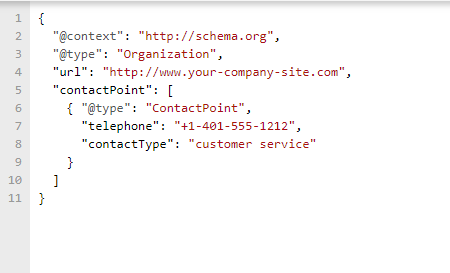
Structured data is extra markup that spells out what your page is about: a product, a recipe, an event, an article. Google uses it to build the richer search results with stars, prices and images. We check whether your page has any, and list the types we find.
We do not judge whether your markup is valid. Validation needs Google's own inspection of your verified site, which a free anonymous check cannot reach. For that, use Google's Rich Results Test.
A plain guide to structured data
OpenGraph tags

OpenGraph tags decide how your link looks when someone shares it.
OpenGraph tags control the title, description and image that appear when your page is shared on LinkedIn, Facebook, Slack or WhatsApp. Without them, the platform guesses, and it usually guesses badly. We check for the full set and name the ones you are missing.
Word count
Very thin pages struggle to rank, because there is not enough on them for Google to understand what they are for. We count the words in your page body and mention it when the total drops under 300. This is a suggestion rather than an error: a contact page does not need 300 words, and a blog post that only has 200 probably does.
What Google's helpful content updates expect from a page
Text to HTML ratio
This compares how much of your page's source code is readable text against how much is markup, scripts and styling. Under 20% we mention it. We never treat it as an error, because on its own it is a weak signal, and plenty of good pages sit below the line.
What the text to HTML ratio actually tells you
One URL
Your site should answer on one address, not two. If both www.example.com and example.com load the same content, Google sees two copies of every page and has to pick a winner. We check whether both versions answer, and whether one redirects to the other the way it should.
How duplicate content hurts you, and how to fix it
Page not found
We ask your site for a URL that cannot exist and look at what comes back. A missing page should return a real 404 status code. Some sites redirect to the homepage instead, which tells Google the page exists when it does not, and quietly fills the index with copies of your homepage.
How to handle 404 pages properly
Secure connection
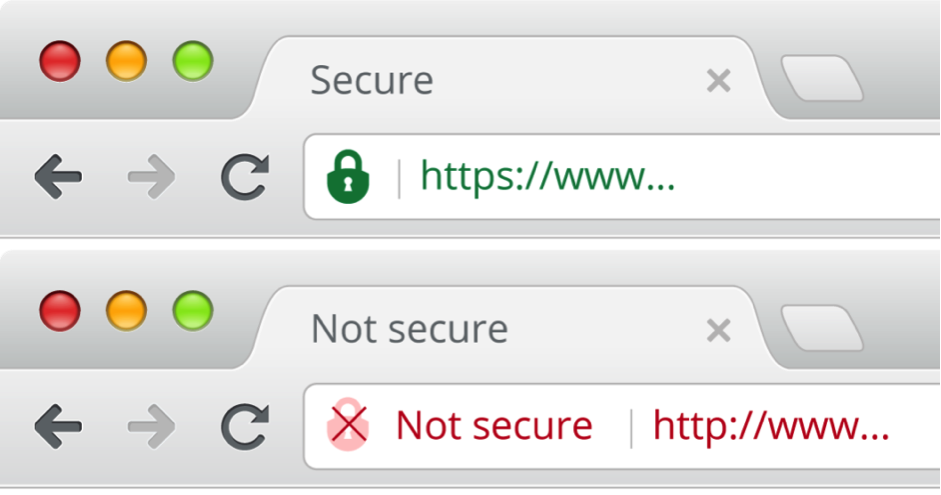
We check that your SSL certificate is there, valid, and not about to run out. We warn you if it expires within 14 days, which is the kind of thing nobody notices until the browser starts showing a security warning. We also check that the secure version is enforced with a redirect, not merely available.
HTTPS and website security in SEO
Robots.txt file
Your robots.txt file tells search engines which parts of your site they may crawl. We check whether you have one. It is a small file that can do a lot of damage when it is wrong, so it is worth knowing where you stand.
What belongs in your robots.txt file
Favicon
The favicon is the small icon next to your page title in a browser tab, and next to your result in Google on mobile. We check whether your site has one. It will not move you up the rankings, but it makes your result look like it belongs to a real business.

What a favicon is and how to add one
Two checks that only appear when they apply
Most pages never see these, so we would rather explain them here than promise them up front.
Hreflang language. This appears when your page has both a language attribute and an hreflang tag pointing at itself. When it does, we compare the two and tell you if they disagree, which is a common cause of the wrong language version showing up in search. See hreflang tags for international SEO.
Lorem Ipsum. This appears if we find placeholder text in your body copy, title or meta description. It happens more often than you would think, usually on a page somebody meant to come back to.
What this check does not cover
An instant check on one page cannot do everything, and we would rather say so than let you think you have a clean bill of health.
- Page speed. Measuring it properly takes longer than anyone wants to wait on a free tool, so we leave it out here.
- Broken links. Every link on the page needs its own request. Use the dedicated broken link checker instead.
- Anything that needs a full crawl. Internal linking, orphan pages, redirect chains, pages missing from your sitemap and duplicate titles across your whole site all need every page, not one page.
That last group is what SiteGuru does when you connect a site: it crawls everything, checks it against the same rules, and sorts the results into a list of what to fix first.
What is on-page SEO, exactly?
On-page SEO covers everything on the page itself that affects how it ranks: the title, meta description, headings, content, images, internal links and markup. It sits next to technical SEO, which is about how your site is built and crawled, and off-page SEO, which is mostly about links from other sites.