

The SiteGuru MCP server connects your SiteGuru data straight to your AI assistant. Instead of opening reports, you can ask "What should I fix first on my site?" and your AI pulls the answer from your live SiteGuru data and explains it in plain English.
SiteGuru is an approved connector in Claude and an approved plugin in ChatGPT, so in both you can add it in a few clicks. This page covers what it does and what you need, then points you to the exact setup steps for your tool.
Choose your AI tool
Setup takes a couple of minutes. Pick the guide for the tool you use:
- Connect SiteGuru to Claude - for Claude, Claude Desktop, Claude mobile and Claude Code.
- Connect SiteGuru to ChatGPT - added in a few clicks, no key to copy.
What you can do with it
Once connected, you can ask your AI assistant about any site in your account. A few examples:
- What should I fix first on example.com?
- Which pages on example.com are missing a meta description, or have a title that's too long?
- Is example.com fully indexed? Which pages aren't?
- Give me a summary of the biggest SEO issues on example.com and how to fix them.
- What are the main issues on the page example.com/about?
- What does my backlink profile for example.com look like?
But it's more than just SEO audit data. The AI can also access ranking data, backlink data, and all other data you find in SiteGuru reports:
- How is traffic to example.com trending, and which pages lost the most visits last month?
- What are my top keywords for example.com, and where do I rank for each?
- Which keywords is example.com ranking just below page one for, the easiest wins?
Because your AI assistant can combine this with everything else it knows, you can go further, for example asking it to draft new meta descriptions for the pages that are missing one, or to turn your to-do list into a prioritized plan.
What you'll need
Who can use it
You need a SiteGuru plan that includes MCP access, and you connect as an account owner. Access is tied to your account: a connection can reach exactly the sites you can access in SiteGuru, and nothing else. Access is re-checked on every request, so if a site is later removed from your account, the connection can no longer reach it.
What data is available today
Right now the MCP gives your AI assistant access to your audit data:
- Your prioritized to-do list (what to fix next)
- All your SEO audit data: page titles, meta descriptions, headings, image alt text, structured data, canonical URLs and page speed
- Detailed page reports
- Indexation status of your pages
- Backlink data
Two ways to connect
Adding SiteGuru from Claude's connector directory or ChatGPT's plugin directory needs nothing from you but a couple of clicks. Every other tool needs the SiteGuru Server URL:
https://mcp.siteguru.co/mcp
From there you have two options:
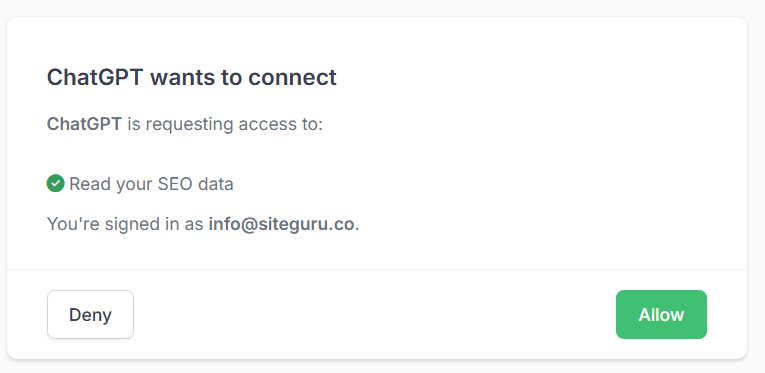
- One-click connection (recommended). Your AI tool opens a SiteGuru page where you click Allow. You're already signed in, so there's no key to copy and no secret to store. This is the route for Claude, Claude Desktop, Claude mobile, Claude Code and ChatGPT.
- API key. Create a key in SiteGuru and pass it to your tool as a Bearer token. Ideal for scripts, CI, or any client that doesn't support the one-click flow.
Both methods reach the same data. The tool guides below walk through whichever fits your setup.
Ask your first question
To check everything works, ask your assistant:
Which sites do I have in SiteGuru?
It should list the sites on your account. Then try:
What should I fix first on example.com?
(replacing example.com with one of your own sites). Your assistant will fetch your to-do list and walk you through the top issues.
Some inspiration: more questions
Getting oriented
- Which sites can I check with SiteGuru?
- What should I work on first for example.com?
Audit a specific page
- What's wrong with my homepage on example.com?
- Give me a full audit of /pricing on example.com: title, H1, meta description, everything.
Find specific problems across the whole site
- Which pages on example.com are missing a meta description?
- Show me every page with its H1. I want to see which ones are missing or duplicated.
- Are there any broken internal links on example.com?
- Show me canonical URL issues on example.com, anything pointing to a redirect or 404?
Indexation, Google, and the sitemap
- Which pages on example.com are not indexed by Google?
- Is my sitemap healthy? Any URLs in it that 404 or redirect?
Page speed
- How fast are my pages on example.com? Show me the slowest ones first.
Backlinks
- Give me a backlink overview for example.com: total backlinks, referring domains, spam score.
- Which backlinks have a high spam score or are broken? Anything I should worry about?
Site-wide technical checks
- Run all the site-wide technical checks on example.com. SSL, robots.txt, 404 handling, all of it.
Traffic and rankings
- How is my organic traffic trending on example.com? Show me the pages that lost the most visits.
- Did traffic go up or down since last month, and which pages drove the change?
- What are my top keywords for example.com, and where do I rank for each?
- Show me my low-hanging-fruit keywords, the ones on page two I could push to page one.
Managing your connection
If you connected with an API key, you can see when each key was last used and revoke any key you no longer need on the API access page. Revoking takes effect immediately, and a separate key per tool means you can revoke one without affecting the others.
If you connected with the one-click flow, you can disconnect at any time from your AI tool's connector settings.
Troubleshooting
- SiteGuru isn't showing up / the tools aren't available. Fully restart your AI tool after connecting, then check the tool-specific guide above.
- MCP access isn't included in your plan. The MCP server needs a plan that includes MCP access. Upgrade your plan, then connect again.
- Authentication or "unauthorized" errors. For the one-click flow, reconnect and click Allow again. For an API key, your key is probably wrong or revoked, create a new one on the API access page.
- No sites found, or a site can't be reached. A connection only reaches the sites on its owner's account. Check you're using the right account, and that the site is still in your account.
Still stuck? Get in touch and we'll help you get connected.