

Most SEO reports are built around short-term changes. You compare this week to last week. This month to last month. Maybe this quarter to the previous quarter.
That’s useful, but it also means you can miss one of the most common SEO problems: pages that slowly lose traffic over time. A page may lose 5% of its Google clicks one month, then another 7% the next month. None of those drops look dramatic on their own. But when you zoom out, that same page may have lost 40% of its organic traffic over the past six months.
That's content decay.
Content decay happens when a page that used to perform well gradually loses organic visibility, clicks, or value. The page may still rank. It may still get traffic. It may not show up in your weekly reports as a major problem. But it is quietly becoming less useful as an SEO asset.

The good news is that decaying content is often easier to improve than brand-new content. The page is already indexed. Google already knows it. It may already have backlinks, internal links, historical engagement, and some level of topical authority. In many cases, you are not starting from zero. You are improving something that already worked.
That does not mean every traffic drop is content decay, or that every old article needs to be updated. Some topics naturally become less popular. Some pages lose clicks because the search results changed. Some content simply no longer matters to your business. The real opportunity is learning how to spot the pages that are worth saving.
In this guide, we’ll explain what content decay is, why it happens, how to find pages that are losing organic traffic, and how to decide whether a page should be refreshed, rewritten, consolidated, or left alone.
What is content decay?
Content decay is the gradual decline in organic performance of a page that used to perform better.
In most cases, this means a page is getting fewer clicks from Google than it did before. It may also show up as fewer impressions, lower rankings, a lower click-through rate, fewer conversions, or less revenue. But the core idea is simple: the page used to bring in more organic value than it does today.
The important word here is gradual.
Content decay is usually not a sudden crash. If a page loses 80% of its traffic overnight, there may be something else going on: a technical issue, an indexing problem, a redirect mistake, a major algorithm update, or a tracking problem.
Content decay is slower. A page might lose a small amount of traffic every month. Nothing looks urgent when you compare one week to the next, or even one month to the next. But when you zoom out over three, six, or twelve months, the trend becomes much clearer.
For example, imagine a page that used to get 1,000 clicks from Google every month. Over time, that becomes 920 clicks, then 850, then 780, then 700. Each individual drop may not look dramatic. But after a few months, the page has lost a meaningful part of its traffic.
It is also important to understand what content decay is not. Not every drop in clicks means a page is decaying. A page may lose traffic because the topic is seasonal, because search demand has dropped, because Google changed the search results, or because another page on your site has started ranking instead.
That is why content decay is not just about finding pages with lower traffic. It is about finding pages that are steadily losing organic value, then understanding whether that decline is something you can and should fix.
Why content decay matters
Content decay is relevant for SEOs for two simple reasons: it is easy to miss, and it is often easier to fix than starting from scratch.
The opportunity is that these pages have already worked before. They have been indexed by Google, they have ranked for relevant keywords, and they may already have backlinks, internal links, impressions, clicks, and historical engagement.
That gives you a head start.
This is also why updating existing content can be such a strong SEO opportunity. HubSpot reported that their historical optimization work increased monthly organic search views of updated old posts by 106%, while Orbit Media found that bloggers who update older articles are twice as likely to report strong results from content marketing.
When you publish a brand-new page, you are starting from zero. Google still needs to discover it, understand it, and decide whether it deserves to rank. With decaying content, a lot of that work has already happened. You are improving an existing SEO asset instead of creating a completely new one.
When the topic is still valuable, content decay can be one of the most efficient SEO opportunities. A refreshed page can often recover lost traffic faster than a new page can earn it.
Common reasons for content decay
Content decay can happen for different reasons. Sometimes the content itself has become outdated. Sometimes competitors have improved their pages. And sometimes the search results have changed, even if your page has not.
Before you update a decaying page, it helps to understand what caused the decline. Otherwise, you may spend time rewriting content that was not the real problem.
The content is outdated
This is the most obvious form of content decay. A page that was accurate two years ago may no longer be the best answer today.
Examples, screenshots, product information, statistics, pricing, tools, recommendations, and best practices can all become outdated. Even if most of the article is still correct, outdated sections can make the page feel less useful than competing results.
Search intent has changed
Sometimes people still search for the same keyword, but they expect a different type of result.
A search term that used to rank with a long educational article may now be dominated by comparison pages, product pages, videos, templates, tools, or forum discussions. In that case, the page may decline because it no longer matches what searchers want.
Competitors improved their content
Your page does not have to get worse to lose traffic. Other pages can simply get better.
Competitors may add more complete information, better examples, original data, clearer structure, stronger visuals, FAQs, expert input, or better internal links. If their pages become more useful than yours, your page can slowly lose rankings and clicks.
The search results changed
A page can also lose clicks because Google changes the layout of the search results.
Featured snippets, video results, shopping results, local packs, forum results, AI answers, and extra ads can all reduce the number of clicks available to traditional organic results. For example, Ahrefs found that AI Overviews can reduce clicks to top-ranking organic results. In this case, your ranking may not change much, but your clicks can still go down.
Your own site changed
Content decay is not always caused by the page itself. Changes elsewhere on your site can also affect performance.
For example, you may have removed internal links to the page, changed navigation, created a competing page, updated redirects, changed canonicals, or introduced technical issues that make the page harder for Google to crawl, index, or understand.
The topic became less popular
Sometimes a page loses traffic because fewer people are searching for the topic.
This is not always something you can fix. A page about an old trend, outdated product, past event, or discontinued tool may naturally lose traffic over time. In that case, the best decision may be to leave the page as it is, merge it into another page, or focus your effort elsewhere.
How to find pages with content decay
The easiest way to find content decay is to look at organic clicks per page over a longer period of time.

Short-term SEO reports are useful for spotting sudden changes, but they are not great at showing slow decline. Content decay often becomes visible only when you zoom out and compare several months of data. Animalz takes a similar long-term approach with its content refresh analysis, looking at organic traffic over a longer period instead of relying on short-term changes.
Start with pages that lost clicks
Clicks are the best starting point, because they show the traffic you actually lost.
Do not focus only on percentages. A page that dropped from 10 clicks to 2 clicks lost 80%, but that may not matter. A page that dropped from 2,000 clicks to 1,200 clicks lost 800 visits from Google. That is usually more important.
The best candidates are pages that used to bring in meaningful organic traffic, but now bring in significantly less.
Use impressions as a second signal
After clicks, look at impressions. If both clicks and impressions are down, the page is probably losing visibility in Google.
If impressions are stable but clicks are down, the page may still be visible, but fewer people are clicking it. That could point to a lower ranking, a weaker title, a less attractive snippet, or changes in the search results.
Then look at the keywords behind the decline
Once you have found a declining page, zoom in and look at the keywords behind the drop.
This is where the analysis becomes useful. A page may lose traffic because one important keyword dropped, because many smaller keywords declined together, or because the page lost visibility for a topic it used to cover well.
Only after that, look at rankings and click-through rate. Those metrics can help you understand what happened, but they should not be the first thing you optimize for.
You can do this manually in Google Search Console, but it quickly becomes time-consuming. A dedicated content decay report makes this easier by showing which pages lost the most clicks over time, then letting you zoom in to the keywords that caused the decline.
How to diagnose content decay
Finding a decaying page is only the first step. Before you start updating it, try to understand why the page lost traffic.
This does not have to be complicated. Start with the keywords that lost the most clicks. Those keywords usually tell you what changed.
Did the page lose visibility?
If both clicks and impressions dropped, the page is probably showing up less often in Google.
That can happen because competitors improved their content, your page became outdated, search intent changed, or Google started preferring a different type of result.
Did people stop clicking?
If impressions stayed stable but clicks dropped, the page may still be visible, but less attractive in the search results.
In that case, look at the title, meta description, ranking position, and the search results themselves. Maybe a competitor has a better title. Maybe Google is showing more ads, product results, videos, or AI answers. Or maybe your snippet no longer matches what people are looking for.
Did the keyword still match the page?
Sometimes a page loses traffic for keywords that were never a perfect fit. That is not always a problem.
Focus on the keywords that still matter to the page and to your business. If the lost keywords are no longer relevant, fixing the page may not be worth the effort.
Did another page take over?
Check if another page on your site started ranking for the same keywords.
If that page is a better fit, the decline may not be a bad thing. But if two pages are now competing with each other, you may need to consolidate them, improve internal links, or make the purpose of each page clearer.
The goal is not to explain every lost click. The goal is to understand whether the page is still worth improving, and what kind of update would actually help.
How to fix content decay
There is no single way to fix content decay. The right update depends on why the page lost traffic.
Sometimes a page only needs a small refresh. Sometimes it needs a bigger rewrite. And sometimes the best decision is to leave it alone and focus on a better opportunity.

Update outdated information
This is the most common fix. Check whether the page still reflects the current situation.
Update old screenshots, statistics, examples, product names, pricing, tools, recommendations, dates, and best practices. If the page explains a process, make sure the steps still match how things work today.
This type of update is especially useful for articles that used to perform well, but slowly became less accurate or less complete over time.
Improve the search intent match
If the search results have changed, your page may need to change with them.
Look at the keywords that declined and check what Google is currently showing for those searches. Are the top results still informational articles? Or are they comparison pages, product pages, tools, templates, videos, forums, or ecommerce results?
If your page no longer matches what searchers expect, simply adding a few paragraphs may not be enough. You may need to change the structure, angle, format, or purpose of the page.
Add missing information
Sometimes competitors rank better because they answer the topic more completely.
That does not mean your page needs to become longer for the sake of being longer. But it should cover the questions, examples, objections, and next steps that searchers expect to find.
Use the keywords that declined as clues. They often show which parts of the topic Google used to associate with your page, and where your content may now be too thin or outdated.
Improve the title and snippet
If impressions are stable but clicks are down, the page may still be visible in Google, but fewer people are choosing it.
In that case, review the page title and meta description. Make sure they clearly explain what the page offers, match the current search intent, and give people a reason to click.
This is not about writing clickbait. It is about making the result more useful and specific.
Strengthen internal links
A decaying page may need more support from the rest of your site.
Look for relevant pages that can link to it. This helps users discover the page, and it helps Google understand that the page is still important.
Internal links are especially useful when the page is still valuable, but has slowly lost visibility over time.
Consolidate overlapping pages
If another page on your site is competing for the same keywords, updating both pages may not solve the problem.
In that case, decide which page should be the main page for the topic. You may need to merge content, redirect one page to another, or make the focus of each page more distinct.
Know when not to update
Not every decaying page is worth fixing.
If the topic is no longer relevant, the lost keywords are not important, or the page does not support your business goals, it may be better to leave it alone. Content decay is an opportunity, but only when the page is still worth recovering.
The best content updates are based on what actually changed. Do not just change the publish date or add a few random paragraphs. Use the decline as a signal, then update the parts of the page that caused the page to lose value.
How SiteGuru helps you find content decay
You can find content decay manually, but it takes time. You need to compare longer date ranges, look at page-level clicks, check whether the decline is meaningful, and then dig into the keywords behind the drop.
SiteGuru’s Content Decay report does that work for you.
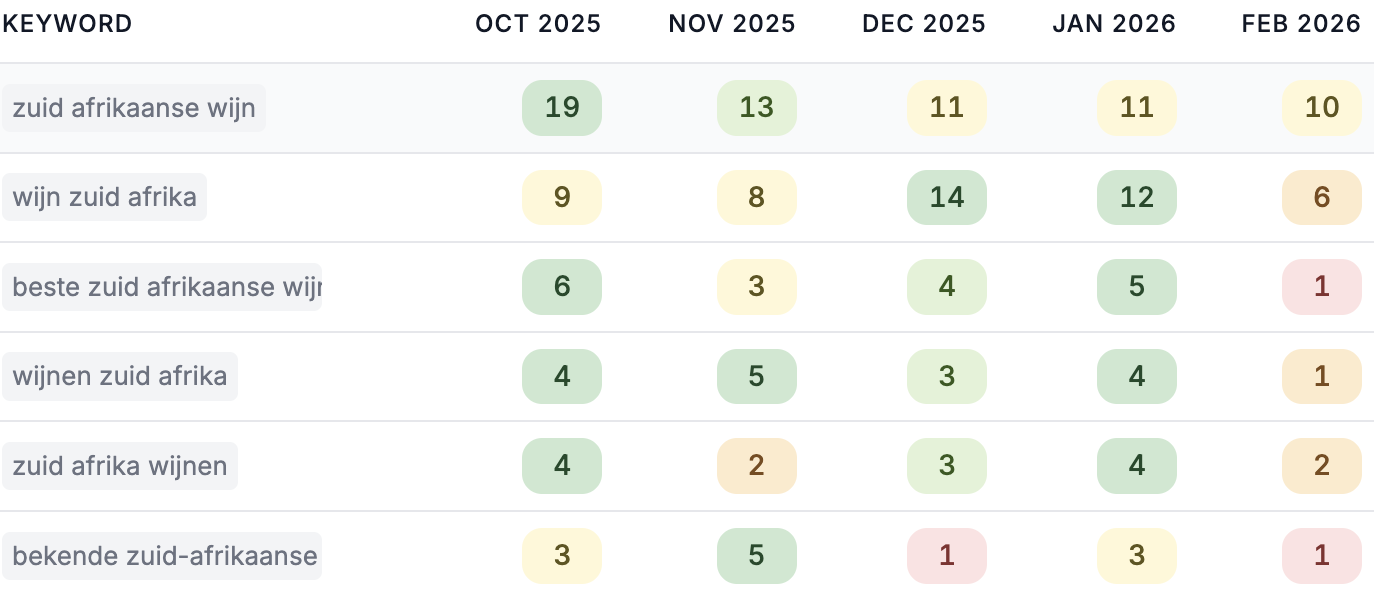
The report shows which pages lost a significant number of clicks from Google over the past few months. Instead of focusing on short-term fluctuations, it helps you spot pages that are slowly losing organic traffic over time.
For each page, you can see how clicks changed month by month. That makes it easier to separate a real decline from a single bad month or a seasonal fluctuation.
You can also click into a decaying page and see which keywords caused the decline. This helps you understand whether the page needs a small update, a bigger rewrite, better internal links, or no action at all.
The result is a more practical way to maintain existing content. Instead of guessing which old pages need attention, you can focus on pages that have already proven their value and are now losing traffic.