

What are Shopify crawl signatures?
Shopify uses a system called Web Bot Auth to let you authorize crawlers to access your online store. By generating a cryptographic signature in your Shopify admin and adding it to SiteGuru, you authenticate SiteGuru's crawler so Shopify knows it's authorized by you.
Without a signature, Shopify may rate-limit SiteGuru's requests, which slows down your audits and can cause incomplete results.
What changes when you add a signature?
- Faster crawl speeds - the "Fast" crawl speed option becomes available for your site.
- Fewer errors - your audits are less likely to be interrupted by rate limiting.
- More reliable results - pages are checked without delays, giving you a complete picture of your site.
Step 1: Create a signature in Shopify
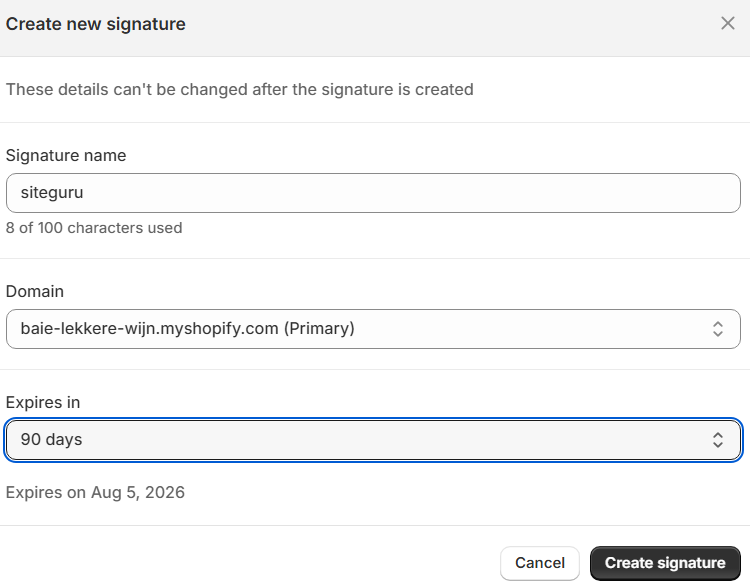
- In your Shopify admin, go to Online Store > Preferences.
- In the Crawler access section, click Create signature.
- Enter a name (e.g. "SiteGuru").
- Select the domain that matches the site you've added to SiteGuru.
- Choose an expiration period (maximum 3 months).
- Click Create.
- Copy the Signature and Signature-Input values.
Each signature is scoped to a specific domain. If your Shopify store has multiple domains, create a signature for the one connected to SiteGuru.
Step 2: Add the signature to SiteGuru
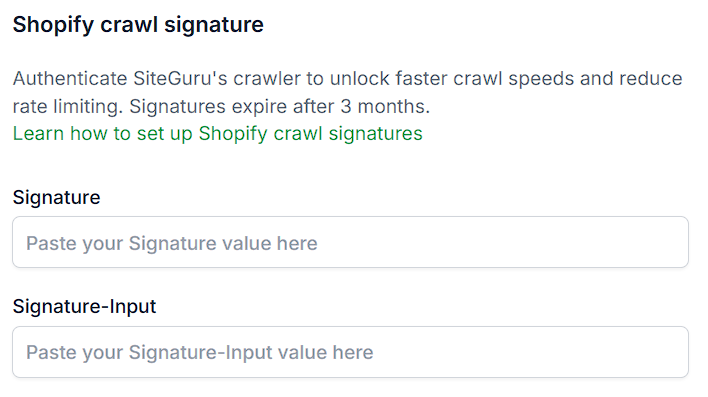
- In SiteGuru, go to Site Settings for your Shopify site.
- Scroll down to the Shopify crawl signature section.
- Paste the Signature value into the Signature field.
- Paste the Signature-Input value into the Signature-Input field.
- Click Save.
Once saved, SiteGuru will include these headers in all requests to your Shopify store.
Signature expiry
Shopify signatures expire after the period you selected (maximum 3 months). Expired signatures cannot be renewed. You need to create a new signature in your Shopify admin and update it in SiteGuru.
SiteGuru will warn you when your signature is about to expire or has expired.
Troubleshooting
- Still getting rate-limited after adding a signature? Make sure you created the signature for the correct domain in Shopify. The domain must match the one connected to your SiteGuru site.
- Signature fields not showing? The signature fields only appear for sites that SiteGuru has detected as Shopify stores.
- "Fast" crawl speed still locked? Make sure both the Signature and Signature-Input fields are filled in and saved.
For more details on how Shopify's crawler authentication works, see Shopify's documentation on crawling your store.